
Auditing freight invoices with Excel is fundamentally possible. With simple tariff structures, a small number of service providers and manageable invoice volumes, a well-structured Excel file can be completely sufficient.
The problem does not start with Excel. The problem starts with complexity and scale.
The more carriers, shipments, weight classes, zones, fuel surcharges, discounts and special conditions a company has, the more difficult it becomes to reliably audit every individual invoice against the conditions that were actually agreed. A simple formula can quickly turn into a system of multiple tables, references, exceptions and manual checks.
The decisive question is therefore not: “Can Excel audit freight invoices?” It is: “How long does an Excel-based freight audit remain reliably manageable given our tariff and data complexity?”
Can freight invoices be audited with Excel?
Yes. In the simplest case, the audit works relatively straightforwardly. For example, a company may have:
- one or only a few carriers
- clear base rates
- few weight classes
- manageable surcharges
- a limited invoice volume
Shipment data and tariff information can then be combined in Excel. A simplified process looks like this:
- import shipment data
- identify the applicable tariff
- calculate expected costs
- place the invoiced amount alongside them
- calculate the difference
- manually review suspicious line items
Excel is entirely suitable for this. It would therefore be wrong to claim that companies fundamentally need specialized software. The limits only become visible as the model grows more extensive.
Where does the problem begin with an Excel-based freight audit?
Freight tariffs often do not consist of a single price list. Typical tariff structures may include:
- lanes or zones
- weight classes
- minimum charges
- base freight
- fuel indices
- toll logic
- ancillary services
- volume discounts
- individual special conditions
- time-limited agreements
Each additional dimension increases the number of possible calculation paths. A price may, for example, depend on: carrier × lane × weight × service × tariff period × fuel index × ancillary service.
With a small number of shipments, this can still be manageable. With thousands of shipments, it becomes a different problem.
1,200 invoices are not 1,200 checks
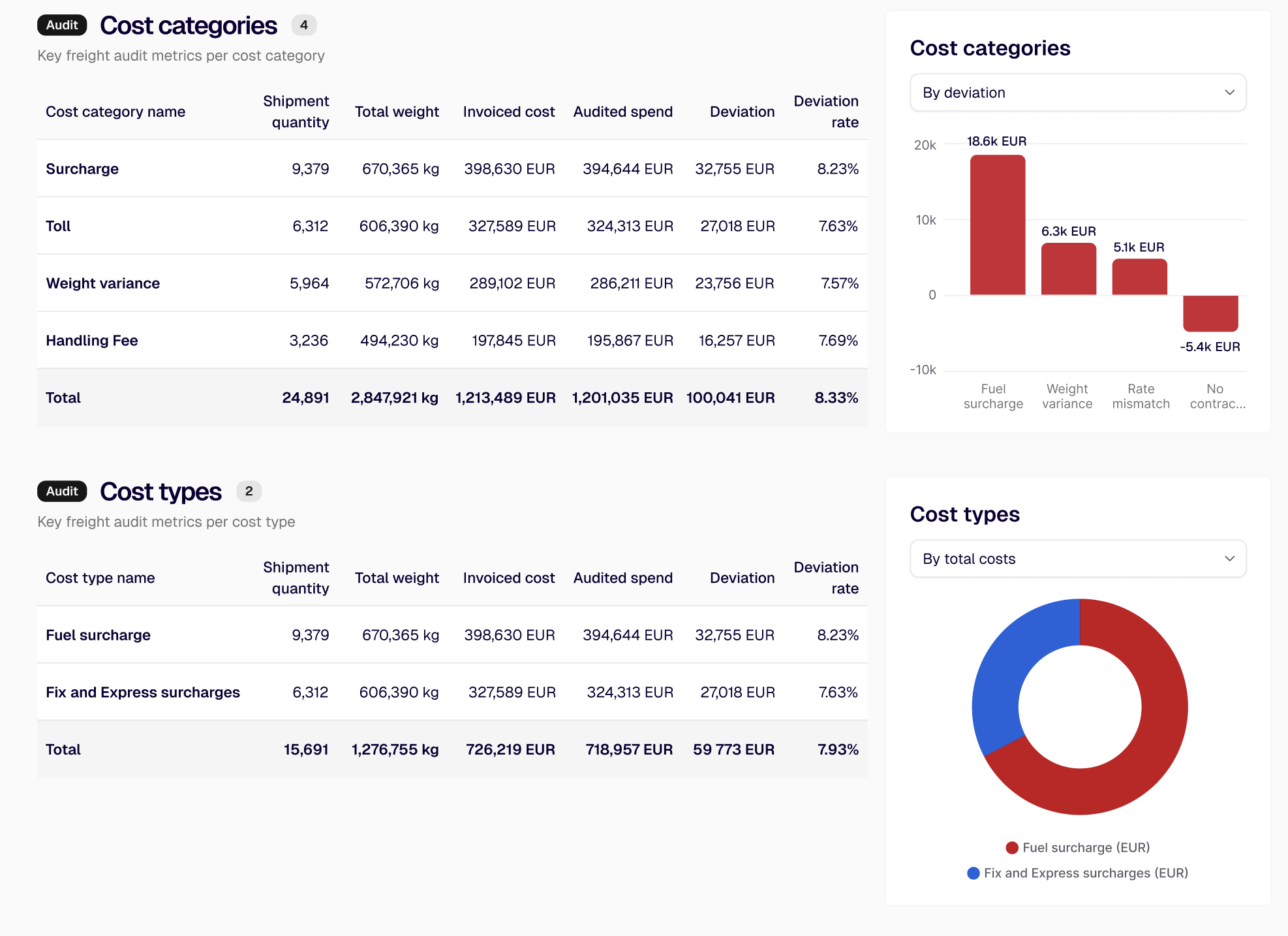
A common misconception is to look at the audit volume based on the number of invoices. One invoice, however, can contain many individual shipments and cost line items. Therefore, 1,200 invoices do not necessarily mean 1,200 checks – tens of thousands of individual expected-vs.-actual comparisons may be required.
This is also the basis of the ShipCheck freight audit: invoices are not viewed only as a whole; individual line items are checked against the agreed conditions. ShipCheck explicitly describes this distinction as a full audit rather than sample checking.
This changes the actual scaling question. Not: “Can our team open 1,200 invoices?” But: “Can our team check every relevant line item on those invoices against all applicable tariff rules?”
Excel scales calculations – but not automatically the entire process
Excel can calculate enormous amounts of data. That is not the actual bottleneck. The processes surrounding the calculation are more difficult:
- keeping tariffs up to date
- standardizing different formats
- entering new tariff versions
- updating surcharge logic
- correctly mapping exceptions
- checking data quality
- documenting errors transparently
- identifying recurring variances
- generating claims data
The larger the model becomes, the more its reliability depends on the structure, formulas and data maintenance remaining consistently correct. A single incorrect formula can then distort not just one calculation, but thousands.
The real risk often lies in tariff maintenance
A freight invoice audit is only as good as the tariff against which it is performed. This applies to Excel just as much as to specialized software. If, for example, any of the following change:
- the fuel index
- a weight bracket
- a discount
- a zone
- a toll rule
- a special tariff
the change must also be correctly reflected in the audit model. In an Excel solution, this often means someone needs to know which table is affected, which formula must be changed, from which date the new rule applies and whether older invoices still need to be audited according to the previous tariff.
The more complex the tariffs become, the more tariff maintenance itself becomes a specialist process.
Particularly difficult: different carriers
Another scaling effect arises from different service providers. Not every carrier uses the same invoice formats, names line items in the same way, structures surcharges identically or uses the same tariff logic.
What appears as a “fuel surcharge” with Carrier A may be named differently or calculated differently by Carrier B. It is therefore not enough simply to combine data in Excel – it first has to be made comparable. This is precisely where standardization becomes important.
Excel or software: the central difference
The most important difference lies less in the mathematical calculation itself – both systems can calculate. The difference lies in how much of the overall process is automated and standardized.
Excel
Typical process: prepare data → build tariff logic → maintain formulas → search for variances → manually prepare results.
Specialized freight audit software
Typical process: structure tariffs → import invoice data → automatically calculate expected costs → categorize variances → provide results.
The mathematics behind the two approaches may be similar. The difference is the operational effort around it.
Where Excel creates particularly large amounts of manual work
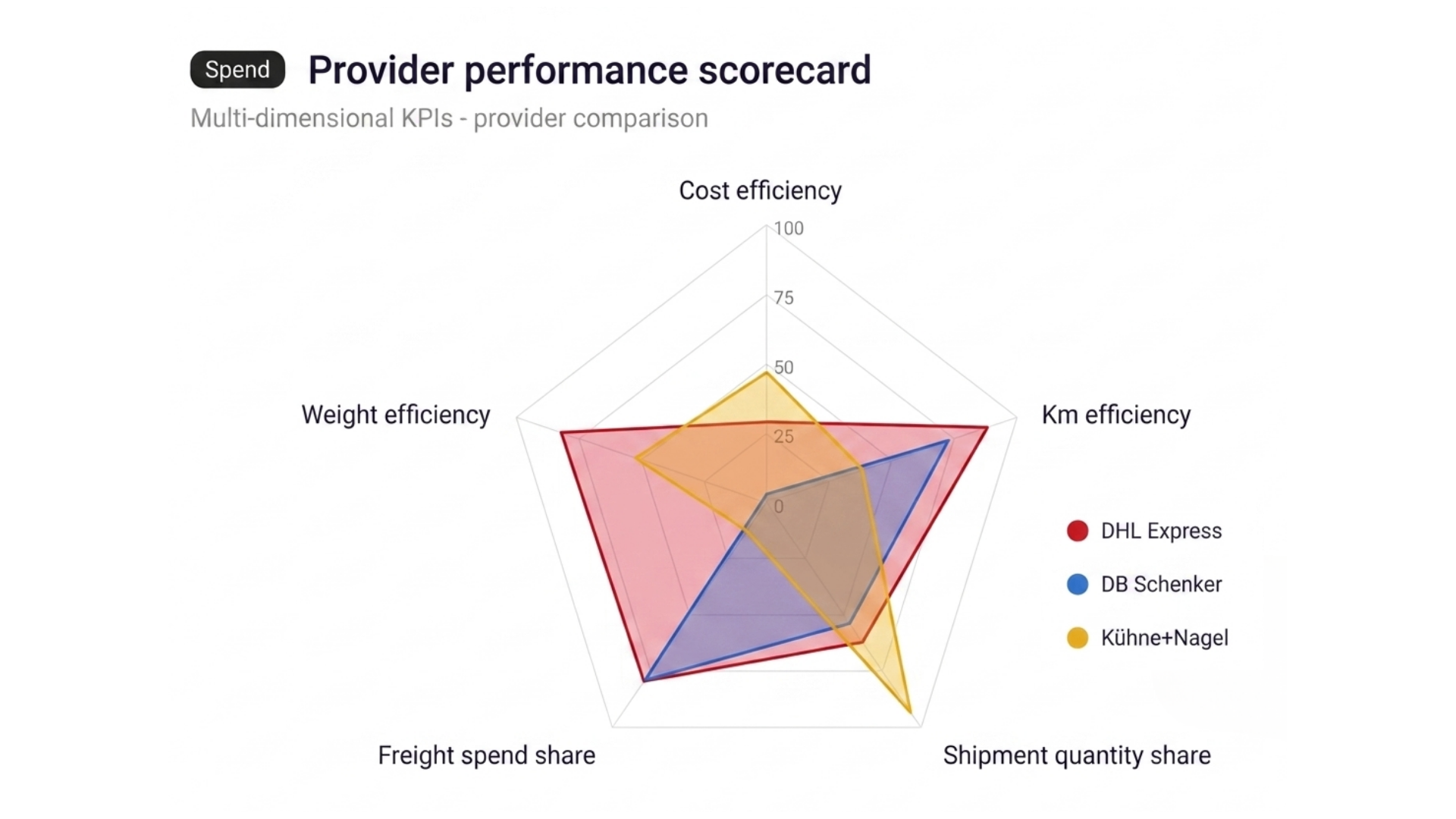
A good example is freight cost KPIs. In theory, a metric such as cost per shipment by carrier and lane is trivial. In practice, exactly these analyses are available in many companies only with significant Excel effort. Particularly relevant metrics include cost per shipment, surcharge ratio and the variance between contract and invoice.
The problem is therefore often not: “Can Excel calculate this number?” Of course it can. The problem is: “How much work is required every month to ensure that this number is correct and up to date?”
Why sample checks become the natural outcome with Excel
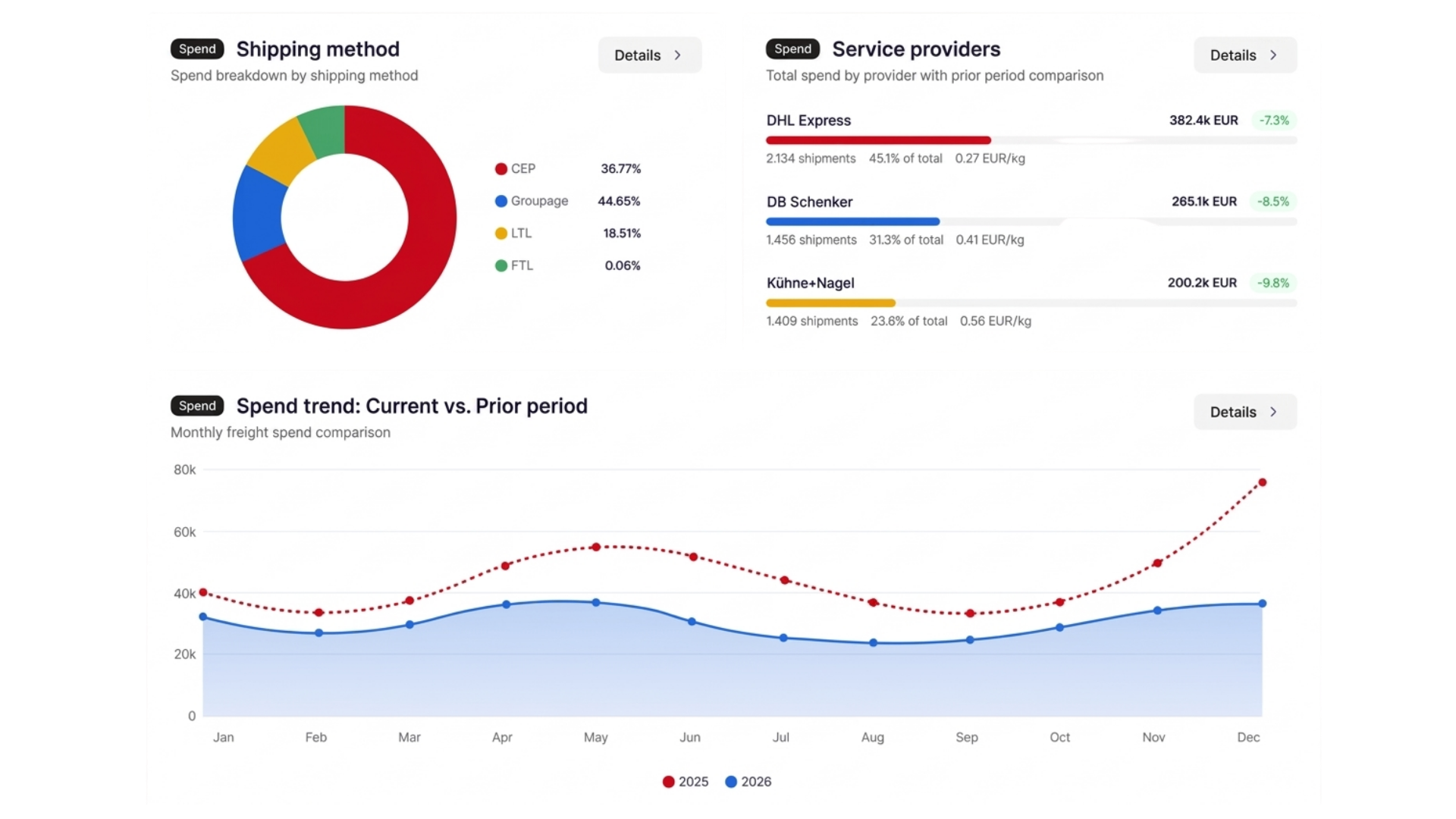
When the manual audit workload becomes too high, the pragmatic reaction is often not to check everything. Instead, companies may check large invoices, unusual amounts, specific service providers or individual samples.
That reduces the workload considerably. But it also changes how meaningful the audit is. A systematic error does not have to occur on a particularly large invoice – it can be spread across thousands of unremarkable line items.
A missing discount of only a few percent, for example, may barely stand out on an individual shipment. If it is continuously no longer applied, however, it can accumulate into a significant total amount.
Why systematic errors are particularly suited to software
One of the greatest strengths of automated auditing is therefore not finding spectacular one-off invoices. It is recognizing recurring patterns. Examples include:
- A discount is no longer applied from a certain month onward.
- A particular weight bracket is repeatedly applied incorrectly.
- A surcharge is systematically calculated too high by one carrier.
- An ancillary service is charged regularly even though it was not agreed.
- An old tariff continues to be used after a contract change.
Such errors are often small per shipment. That is precisely why they are harder to detect manually. ShipCheck, for example, describes a case in which a volume discount was apparently no longer applied over an extended period and was only identified through structured analysis.
Cases like these illustrate the logic behind automated auditing: do not only search for large errors, but identify recurring variances across large volumes of data.
When Excel is sufficient for freight invoice auditing
Excel remains a sensible solution when the starting point is manageable. For example:
- few carriers
- low shipment volume
- simple tariff models
- few variable surcharges
- infrequent tariff changes
- good data quality
- one responsible person with clear process ownership
Under these conditions, implementing specialized software may be unnecessary. A good Excel solution may then be the most economical option.
When specialized freight audit software becomes more appropriate
The value of software increases when several factors occur at the same time:
- many shipments
- multiple carriers
- complex tariff matrices
- frequently changing surcharges
- different invoice formats
- multiple locations
- regular tariff changes
- high manual audit effort
- a need for complete rather than sample-based auditing
- a need for continuous reporting
There is no universal threshold such as “Above 5,000 invoices, you need software.” Such a statement would be too general. A company with few invoices but extremely complex tariff structures may benefit earlier than a company with many invoices and very simple flat rates.
The decisive factor is therefore the combination of: volume × tariff complexity × number of service providers × desired audit depth.
Tariff digitization is the real transition
Switching from Excel to specialized freight auditing does not simply mean: “We now upload the same spreadsheet into another tool.” The decisive step is turning tariff documents into a structured, calculable model.
ShipCheck describes a process in which tariff structures are first uploaded and structured using AI. A tariff specialist from the HDS team then checks and approves the resulting model. Invoices can subsequently be audited against it automatically.
This is a different operating model from an individually maintained Excel file – not because the underlying formulas are fundamentally different, but because tariff knowledge, data structure and auditing are organized as a continuous process.
Why AI alone does not solve the problem
An automated solution also needs to understand tariff logic correctly. An incorrectly digitized tariff simply results in faster incorrect audits. That is why the combination of automation and specialist control matters.
ShipCheck describes its approach as human-in-the-loop: ShipCheck’s AI handles tasks that scale well, including structuring invoice and shipment data and preparing complex tariffs. People, by contrast, review the digitized tariffs and approve audit rules, among other tasks.
This addresses a core problem of automated freight auditing: speed only helps if the underlying tariff model is correct.
Excel vs. freight audit software compared
| Area | Excel | Specialized software |
|---|---|---|
| Simple tariff auditing | Well suited | Well suited |
| Complex tariff matrices | Possible, but maintenance-intensive | Designed for this use case |
| Large data volumes | Can be calculated | Automated process |
| Tariff maintenance | Often manual | Structured tariff process |
| Multiple carrier formats | Manual harmonization | Data can be standardized |
| Variable surcharges | Formulas must be maintained | Tariff logic can be stored |
| Full audit | Possible, but labor-intensive | Core objective |
| Pattern recognition | Additional analysis required | Systematically possible |
| Claims preparation | Usually manual | Can be integrated into the audit process |
| Ongoing reporting | Must be built and maintained | Can be part of the platform |
The difference is therefore less: “Excel cannot do it.” It is: “How much of the process must the company build and operate itself on an ongoing basis?”
Excel is a tool – not a control strategy
The decision should therefore not be understood as an ideological choice between Excel and software. Excel is a very powerful tool. Specialized freight audit software, by contrast, is a standardized process for a very specific task.
A company that only needs to audit a small number of invoices against simple tariffs may not need such a process. A company that wants to regularly check large volumes of complex freight invoices, however, will eventually need to ask whether its internal Excel solution is still the most efficient and reliable approach.
How ShipCheck automates the process
ShipCheck was developed from workflows used by the HDS International Group. According to the company, the background was very pragmatic: consulting clients repeatedly asked whether invoice auditing, KPI reporting and tendering could be made permanently available as self-service tools. ShipCheck ultimately emerged from this demand.
For freight auditing, that means:
- Tariffs are digitized and made calculable.
- Invoice and shipment data are structured.
- Line items can be checked against the agreed conditions.
- Variances are made systematically visible.
- Results can be used for claims and ongoing controlling.
The underlying audit logic is not necessarily different from that of a very good manual or Excel-based audit. The difference is making this logic scalable on a continuous basis and across large volumes of data.
Conclusion: Excel works – until the audit process becomes larger than the spreadsheet
Auditing freight invoices with Excel is neither wrong nor outdated. With simple structures, it can be exactly the right solution.
The limits arise where a single calculation becomes a control process that has to be maintained continuously: many carriers, thousands of shipments, complex tariff matrices, variable surcharges, different formats and frequent changes.
At that point, the decisive issue is no longer whether Excel can technically perform the calculation. The decisive question is: How much manual effort does the company need to ensure that every calculation remains correct over time? That is exactly where the difference lies between a spreadsheet and specialized freight audit software.
Frequently asked questions
Can freight invoices be audited with Excel?
Yes. With simple tariffs and manageable invoice volumes, expected costs can be calculated in Excel and compared with the invoiced costs.
When is Excel sufficient for freight auditing?
Excel is particularly suitable when there are few carriers, simple tariff structures, low data volumes and infrequent tariff changes.
When is freight audit software worthwhile?
Software becomes particularly relevant with large shipment volumes, complex tariffs, multiple carriers, variable surcharges and a requirement for complete, ongoing auditing.
What is the biggest difference between Excel and freight audit software?
The main difference lies less in the calculation itself than in automating the overall process: data preparation, tariff maintenance, expected-vs.-actual comparison, variance detection and reporting.
Can Excel also audit fuel surcharges?
Yes. If the contractual formula is correctly modeled in Excel and continuously updated, fuel surcharges can also be calculated and checked.
Is software automatically more accurate than Excel?
No. Both can produce incorrect results if the underlying tariff rules or data are wrong. The quality of the tariff model and input data is decisive.
Why is tariff digitization important for automated freight auditing?
Because the software first has to understand which conditions apply to a shipment. Tariff documents therefore need to be converted into calculable rules for factors such as weight, zone, fuel, tolls and ancillary services.
Does freight audit software completely replace Excel?
Not necessarily. Excel remains useful for ad hoc analyses and individual evaluations. Specialized software primarily handles recurring, standardizable audit and control processes.