Many companies already have their freight and transport data digitally: as a PDF invoice, as an Excel file from a carrier, as a CSV export from an ERP or TMS – or spread across several of these sources.
The problem is therefore often not that no data exists. The problem is that it doesn't exist in a common structure.
Before questions like these can be reliably answered, the underlying invoice and shipment information must first be structured and consolidated:
- What does a shipment cost?
- Which lanes are driving our costs?
- How are individual carriers developing?
- How high are diesel and other surcharges?
- Which shipments or cost items stand out?
ShipCheck can import shipment and invoice data from PDF, Excel and CSV, among other formats, and structure it with AI. This data foundation then enables analyses such as cost per shipment, cost by carrier, or surcharge shares.
The decisive difference is: a file can be digital without its content already being analyzable.
Why digital transport data can still be hard to compare
Freight information is often generated in different places. One carrier delivers a PDF invoice, another provides Excel files, and further shipment information sits in the TMS or ERP.
HDS describes this as a typical problem: logistics costs in companies are often spread across various systems. Without central structuring, trends and deviations remain hard to see.
This creates several individual data sources that each contain information but do not yet provide a shared view of freight costs. For a cross-cutting analysis, the data must first be brought into a form in which, for example, shipments, carriers, lanes, weights, costs, surcharges and time periods can be evaluated together.
PDF, Excel and CSV are only the starting format
The file format alone says little about how well transport data can be analyzed.
PDF is primarily a document format. A freight invoice can contain many relevant pieces of information within it:
- individual shipments
- invoice amounts
- weights
- lanes
- surcharges
- further cost items
For software-supported analysis, this information must be made available in structured form from the document.
Excel
Excel data is already organized in tabular form. This often makes processing easier. Nevertheless, each provider can structure their tables differently. What matters most is which information is contained and how it can be assigned to individual shipments.
CSV
CSV files are suitable for structured data exports. Here too, what matters is which fields are present and how they can be used for freight cost analysis.
The decisive question is therefore not "Is the file digital?" but rather: "Is the contained transport information available in a structure that can be compared with the rest of the data?"
Which information is relevant for reliable freight cost analysis
For analysis, the most granular information possible per shipment is particularly helpful. This includes, for example:
- Invoice or shipment data
- Carrier
- Lane
- Weight
- Mode of transport
- Cost items
- Surcharges
- Time period
ShipCheck's existing KPI logic also works with exactly this kind of granularity: freight costs can be viewed by shipment, carrier, lane, mode of transport, surcharge type and time period, for example.
A grand total only shows how much was paid. A structured data foundation additionally allows questions such as: For which transports? With which carrier? On which lane? With which cost components?
From document to analyzable data foundation
The process can be broken down into four simplified steps.
1. Importing invoice and shipment data
The source data is imported into the system. With ShipCheck, shipment and invoice data can be imported as PDF, Excel and CSV, among other formats.
2. Structuring information
The contained information is processed so that it is available as individual data fields. Relevant fields can include, for example:
- Shipment
- Carrier
- Lane
- Weight
- Cost
- Surcharge item
ShipCheck describes the use of its AI for exactly this task: invoice and shipment data is digitized and structured.
3. Making data analyzable in a common structure
Instead of analyzing PDF, Excel and CSV files separately, the structured transport information can be viewed together. This enables a cross-cutting view of freight costs.
4. Making KPIs and anomalies visible
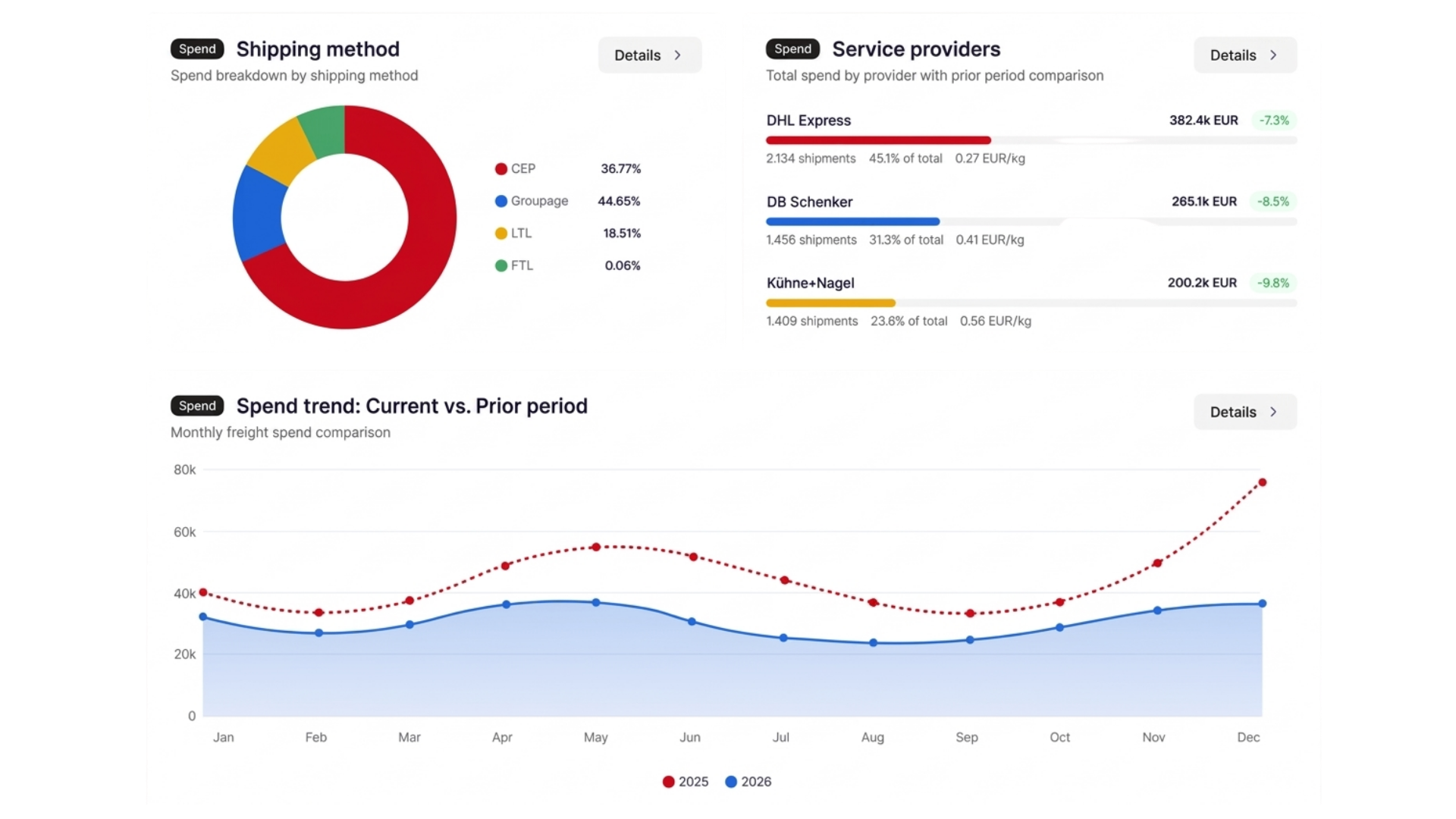
From the structured data foundation, analyses and trends can then emerge. ShipCheck shows, for example:
- Cost per shipment
- Cost per kg or pallet
- Cost trends over time
- Cost by carrier
- Surcharge shares such as diesel or tolls
The central step thus takes place before the dashboard. The information must first be structured so that it can be consistently analyzed in the first place.
Why multiple carriers make data preparation more complex
With every additional logistics provider, further data structures can be added. One provider delivers PDFs, another Excel files, and additional shipment information may sit in the ERP or TMS. This quickly creates a fragmented data foundation.
That's exactly when simple questions become laborious:
- How high are the costs per carrier?
- Which lanes are developing noticeably?
- How is the cost per shipment changing?
- How high is the share of surcharges?
- Which cost types are rising?
A common data structure reduces the need to manually merge different source files for every single analysis.
What AI specifically handles in data preparation
In this use case, AI should not be understood abstractly. The task is very concrete: digitizing and structuring invoice and shipment data. ShipCheck describes exactly this application.
This does not mean the AI automatically makes strategic logistics decisions. It first takes over part of the preparatory data work. This creates a data foundation that the logistics team can then analyze itself:
- Which carriers cause which costs?
- Which lanes are becoming more expensive?
- How are surcharges developing?
- Which shipments stand out?
The benefit of AI here therefore lies primarily in the speed and scalability of data preparation.
Why data quality matters more than the dashboard
A dashboard can only be as good as the data it is based on. If relevant information is missing or costs are only transferred as large lump-sum items, the analysis options remain limited too.
HDS describes data quality in companies as highly variable. Information can be spread across multiple systems, individual records can have gaps, and freight ancillary costs may only be available in aggregated form.
That's why good freight cost reporting doesn't start with visualization. It starts with structured, granular and comparable transport data.
Why the shipment is the central level of analysis
The more aggregated transport costs become, the harder it is to identify the cause of a change. A high-level analysis, for example, only shows: freight costs +5%.
With shipment-level data, on the other hand, you can dig deeper: carrier → lane → shipment. This makes it possible to trace which transports are behind a change.
For a detailed look at this topic, freight cost analysis at the shipment level is the more suitable focus. For data preparation, what matters most is: the source data should allow analysis down to the required level of granularity.
Which analyses can emerge from structured transport data
Once the transport data is structured together, various KPI and cost analyses can emerge from it. For example:
- Cost per shipment
- Cost by lane
- Cost by carrier
- Surcharge shares
- Development over time
Which freight cost KPIs are particularly relevant for logistics management and controlling is covered separately in the article "Freight cost KPIs: which metrics logistics management and controlling really need".
The focus here is different: these metrics require that a reliable data foundation is first created from different source files.
Structuring invoice data is not the same as digitizing freight rates
These two processes should be clearly separated.
Invoice and shipment data
This answers: What actually happened and what was invoiced? It includes actual transports and costs actually charged.
Freight rates
This answers: What was contractually agreed? This includes, for example:
- Weight classes
- Zones
- Base rates
- Diesel rules
- Toll logic
- Ancillary services
- Discounts
This rate information must also be made machine-readable for automated invoice auditing. ShipCheck processes both sides: invoice and shipment data is structured, while complex rate models are made separately calculable for automated auditing.
This makes the separation clear: invoice and shipment data = actual, digitized freight rate = target. Only the combination enables automated target-actual comparison.
What additional ERP or TMS data can add
According to ShipCheck, freight invoices and their associated rates or conditions are generally the relevant starting point. Additional shipment data from ERP or TMS can increase the informative value of the KPIs but is not a mandatory prerequisite for getting started.
The more relevant shipment attributes are cleanly available, the more detailed the costs can later be broken down and explained.
From individual files to ongoing freight cost reporting
A one-off analysis can also be created manually. The bigger challenge arises when new transport data keeps arriving on an ongoing basis. New invoices, shipments, time periods, carriers and cost items must repeatedly be integrated into the existing analysis.
If new data is instead regularly transferred into the same structure, reporting can also be continuously updated. ShipCheck uses the structured transport data for exactly this purpose: KPIs, trends and cost drivers then become visible in the dashboard.
The benefit therefore lies not only in analyzing a file faster. It lies in turning many files into a permanently usable freight cost data foundation.
One data foundation, multiple ShipCheck use cases
Structured transport data is not only relevant for reporting. It also forms the basis for further ShipCheck functions.
- Freight cost analysis: costs can be viewed by shipment, carrier, lane and time period, for example.
- Freight invoice auditing: if the agreed rates are also stored, actual invoice items can be compared with the contractual target costs.
- Tenders: historical shipping data can be used to evaluate offers based on actual transport volumes.
This turns the same transport information into a foundation for multiple areas of freight cost management.
When automated data preparation becomes especially helpful
The benefit increases in particular when:
- many shipments are being processed
- multiple carriers are in use
- data comes from various file formats
- regular reporting is needed
- different lanes or modes of transport are being analyzed
- costs need to be traceable down to the individual shipment
With a small amount of data and a consistent format, manual analysis can be perfectly sufficient. But the more sources that need to be regularly merged, the stronger standardized data preparation becomes the actual advantage.
How ShipCheck processes invoice and shipment data
The process can be summarized in simplified form as follows:
| Step | What happens |
|---|---|
| 1. Import data | Shipment or invoice data is provided as PDF, Excel or CSV, among other formats. |
| 2. Structure data with AI | ShipCheck digitizes and structures the contained invoice and shipment information. |
| 3. Analyze data together | The structured information can be evaluated by shipment, carrier, lane or time period. |
| 4. Make KPIs and trends visible | Freight cost analyses and KPI evaluations emerge from the shared data foundation. |
The decisive benefit therefore lies not solely in the upload. It arises because heterogeneous transport files become a shared, reusable data foundation.
Conclusion: digital doesn't automatically mean analyzable
PDF, Excel and CSV are digital formats. That alone is not enough for reliable freight cost analysis. If invoice and shipment information is spread across different carriers, files and systems, it must first be structured so that it can be evaluated together.
Only then can questions like these be reliably answered:
- What does a shipment cost?
- Which lane is driving our costs?
- How is a carrier developing?
- How high are the surcharges?
- Which transports are behind an anomaly?
ShipCheck uses AI to structure invoice and shipment data from formats such as PDF, Excel and CSV, creating a data foundation for freight cost analysis, KPI reporting, invoice auditing and tenders.
The most important step therefore doesn't happen in the dashboard. It happens beforehand: heterogeneous transport files become structured and comparable data.
Frequently asked questions
Can freight invoices from PDF be automatically evaluated?
Yes. ShipCheck can import invoice and shipment data from PDF files and structure it with AI, so the information can then be used for freight cost analyses.
Can Excel and CSV files also be processed?
Yes. With ShipCheck, shipment and invoice data can be imported as PDF, Excel and CSV, among other formats.
Why isn't a digital file enough for freight cost analysis?
Because the contained information must first be available in a structure that can be evaluated together with other transport data. What matters is not just the format, but the data contained and how it can be assigned.
Which information is relevant for a freight cost analysis?
Depending on the analysis, information such as shipment, carrier, lane, weight, cost items, surcharges, mode of transport and time period is particularly helpful.
What is the difference between invoice data and freight rates?
Invoice and shipment data show what was actually transported and invoiced. Freight rates define the contractually agreed conditions and thus the target costs.
What role does AI play in data preparation?
ShipCheck uses AI to digitize and structure invoice and shipment data. This creates a data foundation that can subsequently be used for analyses and further functions.
Do you need ERP or TMS data?
Not necessarily to get started. However, according to ShipCheck, additional shipment data from ERP or TMS can increase the informative value of the KPIs.
Is this the same as digitizing freight rates?
No. Here, actual invoice and shipment information is structured. In rate digitization, the contractual pricing and calculation rules are made machine-readable.
What can structured transport data subsequently be used for?
With ShipCheck, it can be used for freight cost analysis and KPI reporting, among other things. Combined with the digitized rates, it also serves freight invoice auditing; historical shipping data can also be used for tenders.